PacsScanner
 The document scanning solution for your PACS
PacsScannerTM scans a paper document and stores the pages as a series of images in your PACS. These documents can be anything: insurance cards, lab reports, handwritten notes, etc. In this way all patient information is conveniently available at every PACS workstation for instant retrieval.
Easy to use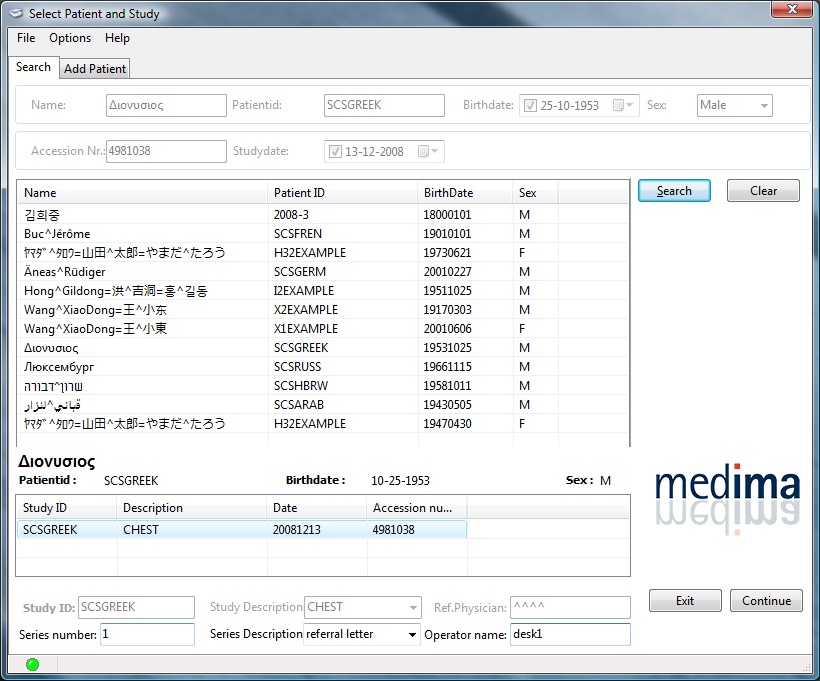
PacsScannerTM is easy to use and does not require any DICOM knowledge. The workflow is simple.
Select a patient study
The patient list is populated with studies from the PACS. Searching is made easy by selection of studies through common demographic filters.
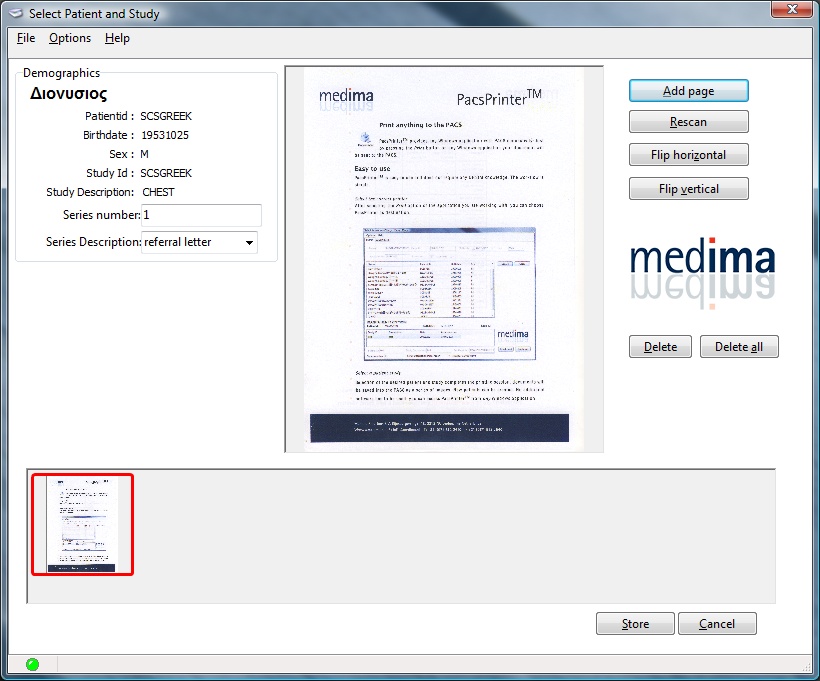 Scan the document and finally press the Store button
All the most common scanning option are present; images can be flipped with full support for black and white and color images. More pages can be included in the same image series.
| Features | |
| Scan paper documents | Any paper document can be imported from a scanner |
| Acquire images from webcams | Pictures from any connected webcm can be acquired and archived |
| Import images and movies | PacsScannerTM works on standard Windowas PCs networked to the PACS system |
| Simple user interface | Anyone can scan documents without any DICOM or PACS knwoledge |
| Document manipulation | PacsScannerTM allows flipping of documents and images and sleection of resolution before transmission |
| Support for internationl charactersets | PacsScanner recognizes and displays all the fonts: arabic, chinese, cyrillic, etc. |
| No extra workstation required | PacsScannerTM works on a standard Windows PC which is networked to the PACS system |